No-Code XR: How XR Creator Studio Lets Anyone Build 3D Experiences
No-code XR tools let non-developers build 3D web spaces. See how XR Creator Studio’s visual editor works in practice.
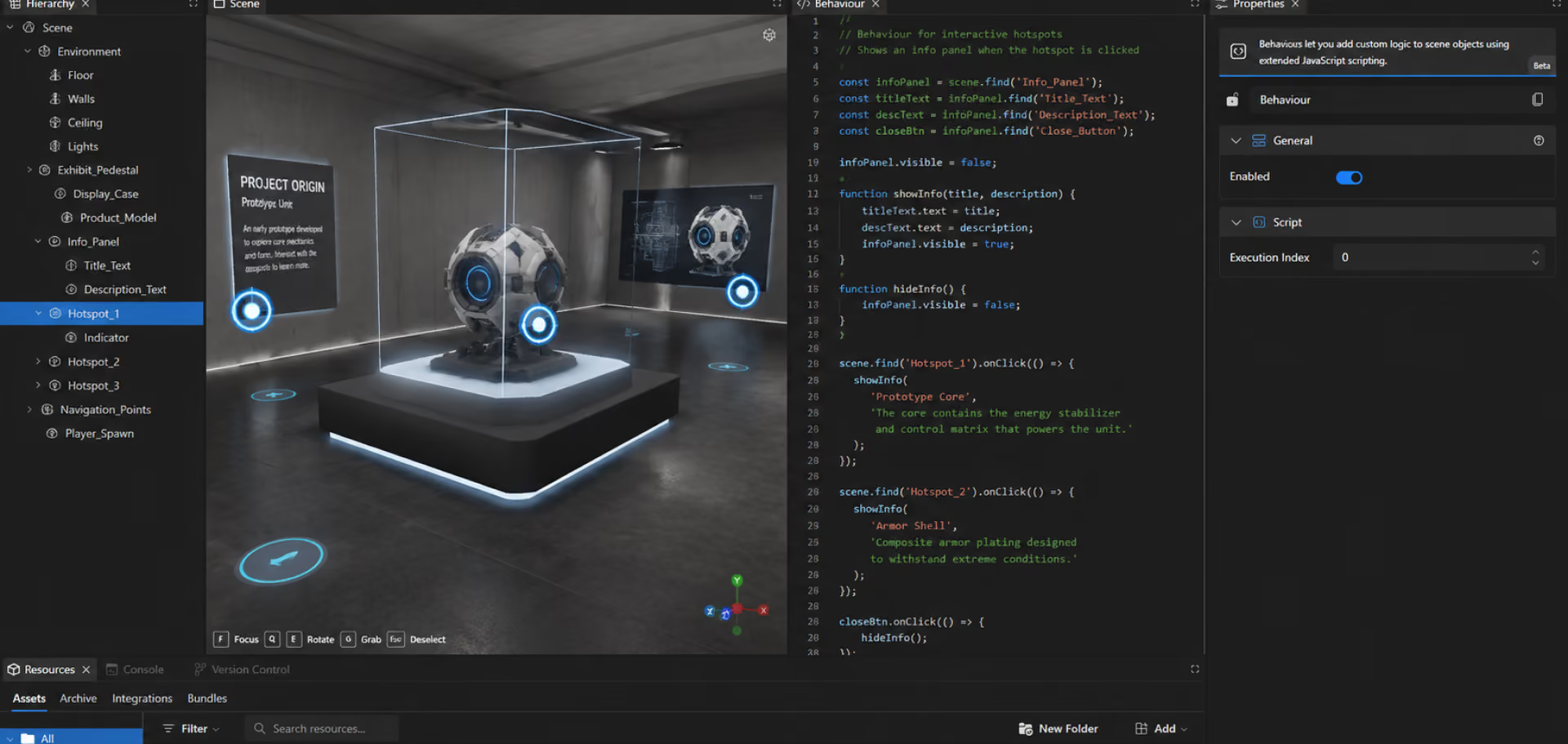
No-code XR means building interactive 3D environments through a visual editor — dragging in models, media, and interactions — instead of writing code. XR Creator Studio is a browser-based no-code editor that lets teams without development experience assemble training simulations, virtual events, and branded worlds directly from imported 3D assets.
The practical effect: the person who knows the training content, the campaign brief, or the product spec can build the environment themselves, instead of translating requirements to a developer and waiting for a sprint.
How the no-code workflow actually works
Three steps cover most builds:
- Import — bring in 3D models in GLB, GLTF, or OBJ format, including models generated by AI 3D-generation tools, plus images, video, audio, and documents
- Assemble — place objects, set scale and lighting, add interactive hotspots, and wire up navigation visually, similar to building a slide deck
- Publish — push the finished environment live as a Verse at a shareable URL, no deployment process required
Optional scripting exists for advanced custom interactivity, but the core workflow — and the vast majority of real builds — never touches it.
What no-code XR unlocks that custom development doesn't
The obvious win is speed. The less obvious one is who gets to build: subject-matter experts (a safety trainer, an events producer, a brand marketer) can iterate on their own environment directly, rather than acting as a requirements source for a dev team. That shortens the loop from "we should change this" to "it's changed" from weeks to the same afternoon.
Common questions about no-code XR tools
- What does "no-code" mean in an XR platform? No-code means building a 3D environment through a visual interface — placing objects, setting properties, and connecting interactions by clicking and dragging — without writing programming code. Advanced customization may still involve optional scripting, but it's never required for a standard build
- Can I use AI-generated 3D models in a no-code XR builder? Yes, if the builder accepts standard formats. XR Creator Studio imports GLB, GLTF, and OBJ files directly, which is the native export format of most generative 3D tools — so AI-generated concept models go straight into a build the same day they're generated.
- Do I need any design or 3D experience to use a no-code XR editor? No prior 3D experience is required for standard builds — the interface is closer to a visual page builder or slide editor than a 3D modeling tool. Some spatial and visual sensibility helps for polished results, but it's not a prerequisite to publish something functional.
- How long does it take to learn a no-code XR platform? Most users publish a basic working environment within their first session, and are comfortable with the full workflow — import, assemble, publish — within a few sessions. Complexity scales with ambition, not with a steep initial learning curve.
- What's the difference between no-code XR and low-code XR? No-code XR requires zero code for a complete build. Low-code XR provides a visual builder plus an optional scripting layer for custom logic beyond what the visual tools cover — Creator Studio supports this pattern, defaulting to no-code with scripting available when needed.
Related reading
See how this works on our enterprise VR training platform page. You may also like In-House XR Team vs. XR Agency: How Enterprises Should Decide and XRHUB Analytics Explained: The Metrics That Prove Your XR Program's ROI.
Get started
Try it yourself — no build required to start. Get a Demo or Build for Free to see it walked through.